

We often receive questions about utility bills and how to pay them.
This article explains electricity bills from Tenaga Nasional (TNB).
What is Tenaga Nasional (TNB)?
It is Malaysia’s main electricity provider, comparable to TEPCO in Japan’s Kanto region.
In the KL Sentral area, electricity is supplied by Malakoff.


How will I receive the bill?
Bills are issued in the owner’s name by TNB, Malakoff or the condominium management.
TNB bills were previously delivered to the mailbox, but paper delivery stopped when billing went paperless in July 2025.
You can now check your bills in the following ways:
1. In the TNB app
2. Through TNB’s online service
3. Set up email billing in the app
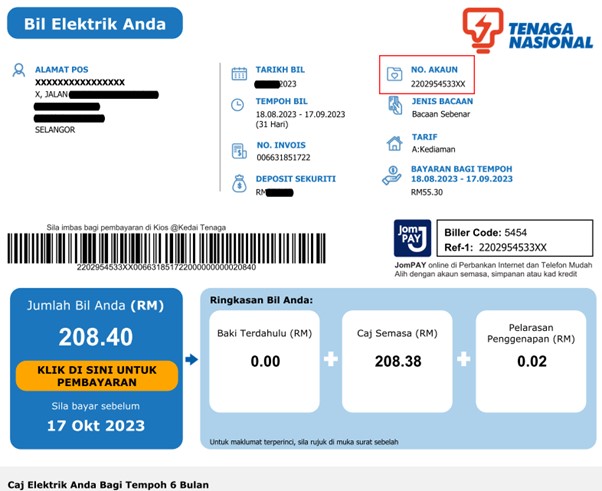
A TNB bill
What is the management office?
It is the condominium’s on-site management office.
It issues bills and access cards and manages the condominium. It is also the contact point for complaints, such as excessive noise from neighbours.
Usual office hours are 9 am–5 pm on weekdays and 9 am–1 pm on Saturdays.
How often will I be billed, and how much?
TNB and Malakoff issue bills monthly.
Bills from management may be monthly, quarterly or on another schedule, depending on the condominium.
The amount depends on usage, but minimum charges may apply even in months with no consumption.
Be aware that the supply may be disconnected if outstanding charges exceed the deposit.
Payment methods
✅ Bills from Tenaga Nasional (TNB)
You can pay through JomPAY, bank transfer, convenience stores, post offices or the TNB app.
✅ Bills from management
Options include cash and bank transfer.
Payment methods are usually listed at the bottom of the bill.
Paying with JomPAY through CIMB Clicks
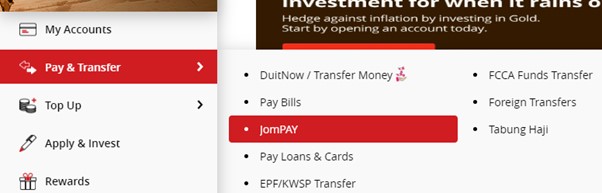
Log in to CIMB Clicks, open “Pay & Transfer”, then select “JomPAY”.
Enter the following details:
✅ Biller Code: 5454 for Tenaga Nasional (TNB)
✅ Ref-1: the 12-digit account number in the “No. Akaun” field at the top right of the bill
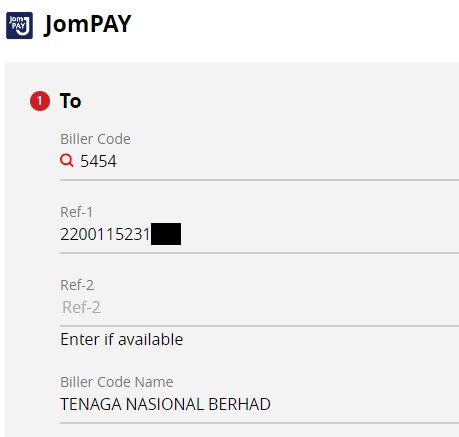
Enter the remaining required details and complete the payment.
Paying through a bank, convenience store or post office
Take the bill to the counter and pay the billed amount in cash.
Always obtain a receipt and keep it.
You can also pay at a bank where you do not hold an account.
Paying through the TNB website
1. Open the following website:
→https://www.mytnb.com.my/
2. Register your login details in the area marked in red.
Registering lets you view your history. If you prefer to pay without registering, use Express Payment in the lower red box.
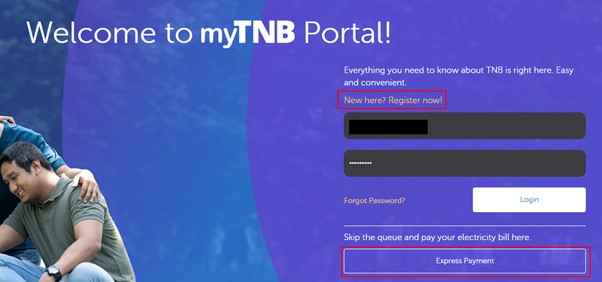
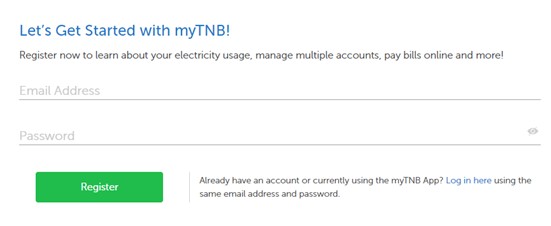
3. Enter your email address and password, then click Register.
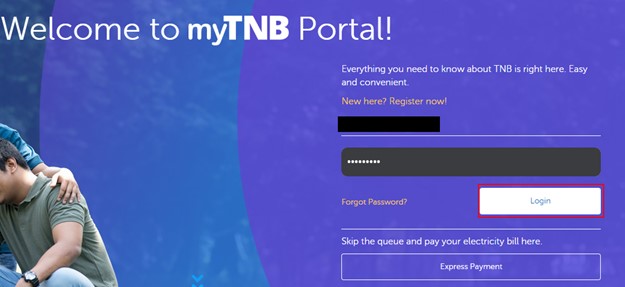
4. After registering, enter your email address and password on the initial screen, then click Login.
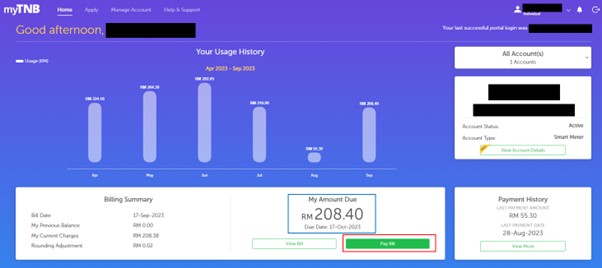
5. Once logged in, you can view usage history and billed amounts.
The blue box below shows the current amount due and payment deadline.
Check the details, then click Pay Bill in the red box.
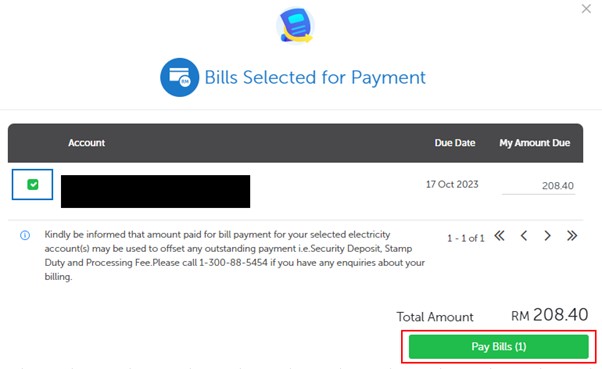
6. Tick the checkbox in the blue box, then click Pay Bills in the red box.
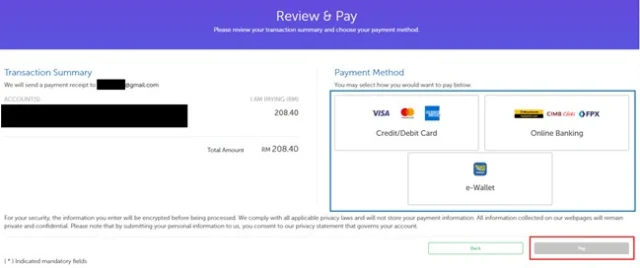
7. Select a payment method in the blue box, then click Pay in the red box.
Follow the on-screen instructions to complete the payment.
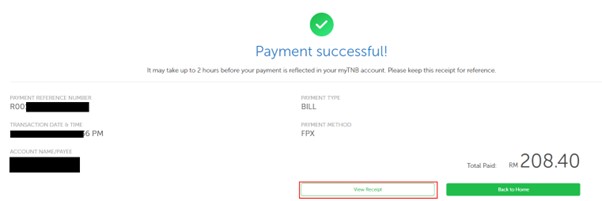
8. Once payment is complete, download the receipt from the area marked in red below and keep it.
Paying through the TNB mobile app
Search for “TNB Malaysia” and download the app with the icon shown below. You can pay in the same way as on the website. The app is also available through the link below.
→https://www.mytnb.com.my/mytnb-app

Payments are sometimes overlooked, especially in large condominiums. Your records provide evidence that you have paid.


